CWDS Schedule Management Plan
This page is currently under development
-
In November of 2015, the CWS-NS Project pivoted to using an agile methodology. The purpose of version 3.0 of this Plan is to update components of the Schedule Process Model as made necessary by the pivot to an agile methodology. With the adaptation of agile, the project began using two approaches to track project activity. A Project Master Schedule, maintained in Microsoft Project, is used to depict and report the overall progress of the project. Teams using the Agile/Scrum methodology use Pivotal Tracker to track and report activity at the team level. The Schedule Management Plan (hereafter called the “Plan”) covers the approach to how data in the two platforms comes together to provide overall high-level project status and how data in Pivotal Tracker is represented in the Project Master Schedule.
1.1 Definitions
Table 1 Terms and Definitions
Term
Definition
Controls
Requirements governing the performance of a task
Epic
An agile term representing a collection of Stories
External Stakeholder
Individuals or groups that contribute to the project when needed and are impacted by the results of the project
Key Milestone
A milestone documented in an approved project planning document (PAPD, IAPD, FSR, SPR, etc.)
Level of Effort (LOE)
A support-type project activity that must be done to support other work activities or the entire project effort. It usually consists of short amounts of work that must be repeated periodically. .. Where the effort varies, cannot be easily estimated, or tasks whose completion does not affect the end date of the project. Such tasks are not defined down to the 10 day duration level.
Sprint
A predefined period of time dedicated to the completion of Stories
Story
An agile term representing a set of tasks
1.2 Related Plans and Processes
Project Management Plan The Project Management Plan describes how the project will be executed, monitored and controlled. This plan is supported by a number of subsidiary plans, including the Schedule Management Plan. Configuration Management Plan The Configuration Management Plan establishes processes and procedures used to maintain the integrity of the project’s work products, including the project schedule. Quality Management Plan The Quality Management Plan establishes the quality policies and processes that are to be performed during the development, review and completion of project artifacts, including the Schedule Management Plan. Communications Management Plan The Project Management Plan describes how the project will be executed, monitored and controlled. This plan is supported by a number of subsidiary plans, including the Schedule Management Plan. 1.3 Document Development and Maintenance During development of this Schedule Management Plan, the guidelines and standards provided through the CWS-NS Quality Management Plan will apply; specifically all peer review requirements must be met. Creation of the Schedule Management Plan baseline will follow the CWS-NS Project guidelines and standards for configuration item management, approval, and baselining as defined in the CWS-NS Configuration Management Plan (CMP). Any change to the plan baseline can only be executed using the CWS-NS project’s Change Management process, as defined in the CMP.
-
2.1 Stakeholders
Table 2 Stakeholder Participation and Expectations
Project Phase
Stakeholder or Stakeholder Group
Organizational Entity
Participation**
Expectations
All
Executive Leadership Team (ELT)
County
DSS
OSI
Consulted,
Informed
Strategic Alignment
All
Project Director, Service Directors
OSI
Consulted,
Informed
Strategic Alignment, Project on track*
All
PMO Manager
OSI
Responsible,
Informed
Project on track
All
Service
Managers.
OSI/CDSS
Responsible,
Informed
MS Project and Pivotal Tracker are aligned
All
Project Managers, Scrum Masters
OSI/CDSS
Responsible, Accountable
Provide updates to the schedule; Initiate change requests; Implement corrective actions
All
Schedule Manager
OSI
Responsible, Accountable
Perform master schedule updates; Analyze schedule for performance measurement; Provide status update in project team meetings
*Making progress and within established constraints/boundary conditions
**Participation level definitions
Responsible
The entity (person or group) that performs the work to complete the task
Accountable
The one who is ultimate owner and answerable for the correct and thorough completion of the task
Consulted
The entity (person or group) whose opinion is sought
Informed
Those who are kept informed (up-to-date on progress)
2.2 Roles and Schedule Responsibilities
This section describes key roles and responsibilities specific to schedule management on the CWS-NS Project.
Table 3 Roles and Responsibilities
Roles
Responsibilities
Project Management Office
Executive Leadership Team
· Approve Change Requests related to major schedule changes, as defined in the Change Management Plan
Project Director,
Service Director
· Overseeing the entire project.
· Providing strategic direction.
· Interface between the ELT and the Service Teams
· Assigning Service Manager and Scrum Master responsible for tasks in the project schedule.
· Leading development of the CWS-NS Project Schedule.
PMO Manager
· Leading development of the CWS-NS Project Schedule.
· Approving the Schedule Management Plan.
· Approving the project schedule baseline.
· Approving minor changes and updates to the project schedule.
· Reporting project status to internal and external stakeholders.
· Presenting change requests to the Executive Leadership Team for changes to the baseline schedule in accordance with the CWS-NS Change Management Plan.
Schedule Manager
· Developing and maintaining the project’s schedule management practice
· Development, update and maintenance of the Schedule Management Plan
· Establishing, training and implementing schedule management process and procedures
· Establish and publish schedule metrics
· Publishing schedule procedures and metrics
· Progressing the schedule per the Schedule Management Plan
· Providing the PMO Manager, Project Managers, and Scrum Masters with recommendations and statuses on the project milestones and project progress.
· Communicating and reporting project.
· Keeping documentation for MS Project templates and project schedule development standards.
· Managing the project schedule baseline at the direction of the PMO Manager.
· Maintaining the Work Breakdown Structure (WBS) in coordination with the PMO Manager.
· Documenting and tracking schedule assumptions for both the approved baseline schedules and the current planned schedule.
· Capturing schedule status information on a regular basis from the Project Managers and Scrum Masters.
· Coordinating scheduling activities with multiple vendors.
Service Managers
· Works with Scrum Masters and Project Managers to identify the work to be included in the Master Schedule.
Scrum Masters, Project Managers
· Works with Schedule Manager to ensure team effort is correctly represented in the Master Schedule.
· Completes the Schedule Update Report to provide updates to the schedule
· Authorizes new tasks to be added to the schedule.
· Plans new work with the Schedule Manager.
· Works with the Service Manager and Schedule Manager to resolve schedule issues resulting from a schedule update.
· Follows the Change Request process as required for schedule related changes.
· Managing task execution including collecting and validating predecessor products.
· Responding to management team level schedule inquiries
· Keeps Service Manager informed concerning schedule status
· Defining and documenting task name, duration, predecessors, successors, and assumptions.
Core Team Members
Project Staff responsible for working with Scrum Master/Project Manager to ensure timely completion of work assignments. Provides activity duration estimates and accurate project status to Project Managers and Scrum Masters.
-
3.1 Scope
The focus of this Plan is on the process model guiding the development, tracking, monitoring and controlling, reporting and close out of the schedule. The Plan will describe touch points between MS Project and Pivotal Tracker as appropriate and may be revised again as vendors come on board.3.2 Approach
The CWS-NS Project is using two approaches to manage and track project effort. The Project Master Schedule, maintained in Microsoft Project, is used to depict and report the overall progress of the project. The Digital Services Teams and select Non-Digital Service teams are following Agile/Scrum and using Pivotal Tracker to track and report effort at the team level. The Project Master Schedule is used to manage project work by identifying, decomposing, and sequencing the tasks required to develop the project deliverables, and to identify major milestones and release information. The tasks in the schedule will be arranged in task groups to facilitate the management of the time and scope of the project. Microsoft Project Teams using MS Project as their primary platform will depict tasks at the Phase, Deliverable, Activity/Task, Milestone and Phase Completion Milestone level. The Schedule Manager will work with the Project Managers to schedule work to be performed by their teams. Project managers will participate in the Schedule Update process. Pivotal Tracker Teams using Pivotal tracker as their primary platform will manage and track Releases, Epics, Sprints, Stories and Story tasks in Pivotal Tracker. Service Managers, working with Scrum Masters, provides the Schedule Manager with high-level milestones in the form of Epics and Releases as well as LOE tasks that are not tracked in Pivotal Tracker. These high-level milestones are tracked in the Project Master Schedule. Since automated dependencies between the two platforms are not supported, Scrum Masters will need to be cognizant of how potential changes in Epics and Stories may impact milestones tacked in the Project Master Schedule. Table 4 below displays where schedule information is captured by Digital Service Teams and Non-Digital Service Teams. Table 4 Project Team use of PlatformsDigital Service Team
Non-Digital Service Team
Scrum Team
Scrum Team
Non-Scrum Team
Pivotal Tracker
- All detailed tasks
- Release markers
- All detail tasks
- Release markers
N/A
Microsoft Project
- High Level Milestones at Release or Epic level
- High level Milestones at Release or Epic level
- LOE tasks
- Detailed tasks
- High level Milestones
- LOE tasks
The Schedule Manager will work with Project Managers and Scrum Masters to update the Master Schedule per the Schedule Update Process described in this Plan. Scrum Masters will work with their teams to update effort contained in Pivotal Tracker. Pivotal tracker does not track dependencies between Epics or Stories within or across Scrum Teams. Tracking of dependencies is accomplished by linking Stories using a physical Scrum board.
3.3 Process Model
Schedule management is an integral part of project management. This Plan is organized according to the sequence of activities performed during the project lifecycle. The feedback loop identifies the new tasks being added or tasks being modified during schedule monitoring & control. Figure 1 identifies the major schedule management processes for the project.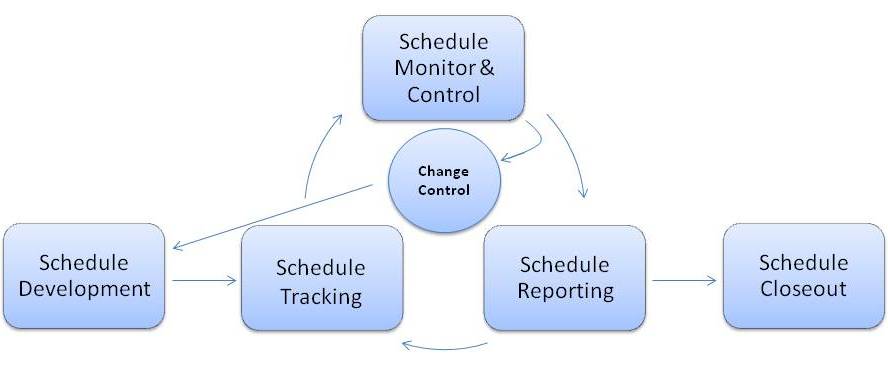
3.4 Schedule Development
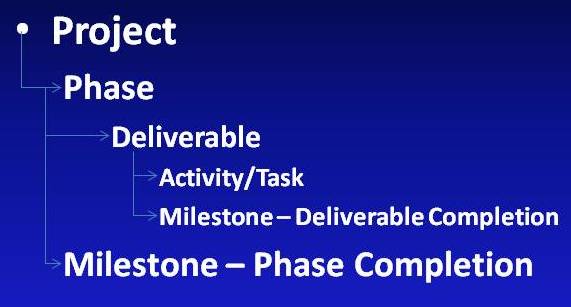
3.4.1 Work Breakdown Structure The Project schedule was initially developed according to the CWS-NS Project Work Breakdown Structure (WBS). A WBS is a hierarchical decomposition of the project into phases, deliverables, and work packages (aka activities or tasks) as illustrated in Figure 2.Figure 2 - WBS Outline
3.4.2 Task Duration Estimation Task duration is an examination and appraisal of a task against time constraint to develop an estimate that specifies a limited and definite period or duration required for the task to achieve its goal and desired outcomes. Estimating task duration involves a consistent process that comprises several basic steps, such as:
- Define a task to be estimated
- Identify time-related requirements
- Decompose the task into smaller elements (sub-tasks)
- Estimate time length for each of the elements
- Determine duration of the task as total of individual time lengths of each element
- Develop an estimate that specifies the task duration
3.4.3 Expert Judgment Expert Judgment technique of activity duration estimation involves consultation with one or more subject matter experts and also uses historical information or information from past projects to develop estimates. The accuracy of this estimation technique depends on the expertise and judgment of the subject matter experts and the availability/accuracy of the historical information.
3.4.4 Standards for Task Definition For the purposes of this Plan, a task is an activity that needs to be accomplished within a defined period of time, or by a deadline. The following standards should be followed for definition of the tasks.
- Task Name: The task name should begin with a verb (action-oriented) and briefly yet clearly describe the task. Further definition of task detail can be recorded in the task notes field in MS Project.
- Task Dates (Start and Finish): Task dates should be established through dependency relationships. In situations where task constraints must be used, record the reason for the constraint in the task notes field in MS Project. Under Agile Scrum, the Sprint start and duration defines the Story start and finish Dates.
- Task Duration: Task duration should never be less than one working day and should not exceed 20 working days. Tasks with duration less than one working day should be considered for consolidation into a higher-level task. Tasks with duration greater than 20 working days should be decomposed into smaller tasks.
3.4.5 Task Dependencies and Sequencing Tasks in the Master Schedule are linked together and sequenced to identify the relationships between activities. These relationships are called dependencies. There are four types of dependencies: Finish to Start (FS), Start-to-Start (SS), Finish-to-Finish (FF), and Start-to-Finish (SF). Benefits of task sequencing include the ability to determine critical path and task float for tasks in the Master Schedule. The following rules should be applied when creating task dependencies in MS Project:
- All tasks in the Master Schedule must have at least one predecessor task, which cannot be a summary task or a roll-up task.
- Tasks in the Master Schedule that contribute to the achievement of a milestone should have at least one successor task, which cannot be a summary task or a roll-up task. A milestone task may not have any successor because it is the termination point of a segment of work.
- Dependencies should not be linked to a summary task or a roll-up task.
3.4.6 Task Resource Assignment Previously the standard definition of a resource name followed the form [F_First Name Last Name. The “F_” allowed state resources to be distinguished from vendor resources and provided the ability to sort the resource column by resource names beginning with “F_”. This was useful when for example one wishes to only display “state” resources. Conversely, resource names that do not begin with “F_” would have represented resources supplied by a vendor, or state resources that are not active. As of May 2016, a project decision was made and logged stating that resources will no longer be assigned to tasks in the Project Master Schedule. The master Project Schedule resource sheet remains intact to support tasks that did have resource assignments prior to the pivot to agile.
3.4.7 Schedule Baseline The CWS-NS Master Project Schedule was initially baselined when the Feasibility Study Report (FSR) was approved. The schedule is subsequently rebaselined upon the approval of a Special Projects Report (SPR). Each time the schedule is baselined in MS Project, the next sequential number is used for the baseline.
3.4.8 New Tasks When new tasks are added to the schedule, the new tasks are baselined using the “baseline” field. The “baseline” field is used to calculate variances when producing schedule reports. The procedure used by the Project Scheduler when managing the baseline is described in a procedure named CWDS SM Procedure 100 - Baseline Log
-
Schedule will be monitored on a regular basis and schedule performance variances will be measured in order to either initiate corrective actions or initiating formal change requests. A change to the finish date of a key milestone that is 20 or more days from its baseline finish date will trigger a change request unless the Project Manager takes a corrective action (crash or fast-track) to remove the deviation. Milestones based on Epics from Pivotal Tracker may move more than 20 days as Stories are added to Epics. A Change Request for Pivotal milestones will not be required as long as the extension to the finish date of the Pivotal milestone does not impact a Release date. Success criteria will include minimization of the variances with respect to the baseline and will be measured in terms of the number of formal/informal change requests per month.
Table 5 Schedule Success CriteriaObjective
Success Criteria/Measures
Develop schedule
Schedule is approved and baselined to the most recent Special Project Report
Track schedule
Schedule is analyzed weekly and analysis results are reviewed by the PM and the project teams in regularly occurring project team meetings.
Monitor & Control schedule
Schedule changes are constantly monitored and controlled via a change control process; All change requests are analyzed against the boundary conditions and those candidates for formal change requests are either sent to Change Control Board for review or corrective actions are initiated to control the deviation.
Report schedule
Biweekly/Monthly status reports are created, reported, reviewed and used to assist in making project decisions.
4.1 Schedule Status Update Cycle
4.1.1 Tracking Schedule tracking begins every Monday of a non-status week (see Update Cycle Section 5.2.4). The Scheduler reviews the MS Project schedule to determine impact to key milestones, and progress on the previous week’s tasks. The project uses the Look Ahead Report to track active tasks by project team. The Look Ahead Report prompts the Scheduler to select a date in the future for analysis. Therefore, a single custom report in MS Project may be used to produce a look-ahead report for any timeframe desired. Currently the project uses a 4 week time horizon on the Look Ahead Report. This report is produced on the “status” Friday, and published to SharePoint. An email is then sent to all Service Managers informing them the 4 Week Look Ahead Report is available for their review. The 4 Week Look Ahead Report is reviewed at the next Service Managers meeting. 4.1.2 Critical Path AnalysisWith the pivot to an Agile methodology, the Master Project Schedule does not contain all activities required to complete the project, or the dependencies between all project activities, so any critical path analysis would be incomplete. Because of this situation, the project no longer conducts critical path analysis on the Master Project Schedule
4.1.3 Schedule Performance AnalysisSchedule Performance Analysis is performed beginning Monday of a non-status week (see Update Cycle below) for tasks in MS Project. Analysis includes identification, review and monitoring of:
- Tasks forecasted to start or finish late
- Tasks scheduled to begin within seven days of the schedule review date
- Tasks requiring an update
- Finish variance days
- Planned % Complete vs. % Complete
- Finish Variance (percent and days)
All schedule reports are archived on the Schedule Management page of the project’s SharePoint site.
4.1.4 The Biweekly Schedule Status Update CycleThe project schedule status is updated on biweekly cycle. The cycle consists of a “status week” and a “non-status week”. Status weeks begin on Monday and runs through Friday. The schedule is published by close of business on the Friday ending a status week. The week following a status-week is called a non-status, or planning week. A non-status week is reserved for schedule planning, adding new tasks, and producing reports. The Scheduler sets the Status-as-of-Date for the project at the beginning of a cycle and coordinates schedule updates with the Project Managers, Scrum Masters and vendor Schedulers who are responsible for providing schedule updates. The workflow for the schedule update process is show in Figure 3 below:
Figure 3 Master Schedule Update Process Workflow

The following sections describe the process specific to schedule status updates. The Project Scheduler produces an extract in MS Excel for each Project Team, including vendors if applicable, detailing all tasks that are active for the reporting period. This extract is called the Schedule Update Report. A copy of a Schedule Update Report is provided in Appendix C. If a vendor maintains a schedule in MS Project, their schedule will be reviewed by the PMO Manager and Schedule Manager on a monthly basis and once approved, will be merged into the Master Schedule. If a vendor used Pivotal Tracker, milestones from the vendor’s Pivotal Tracker site will be captured in MS Project. The Schedule Status Update Report is posted to SharePoint by close of business Monday of a Status Week. Project Managers and Scrum Masters work with their teams to update the Schedule Update Report. The Schedule Update Reports should be completed by close of business Wednesday of a Status Week. This document is stored in SharePoint and may be accessed by clicking on: CWDS SM Procedure 101 - Producing the Schedule Update Report The procedure used by Scrum Masters and Project Managers to update the Schedule Status Report is stored in SharePoint and may be accessed by clicking on: CWDS SM Procedure 102 - Completing the Schedule Update Report
4.2 Schedule Control
Schedule control includes establishing criteria for determination of formal change requests and activities for implementing both formal and informal change requests. A key milestone that has moved by more than 20 days from its baseline finish date will trigger a change request unless the Scrum Master or Project Manager initiates a corrective action (crash or fast-track) to remove the deviation. If a Change Request is necessary, the Service Manager, Scrum Master or Project Manager will complete and submit a Change Request form to the Change Manager. Upon approval of the Change Request the PMO Manager will notify the Scheduler to make the necessary updates to the schedule.
4.3 Schedule Reporting
The Project uses multiple custom MS Project views, tables, filters and groupings to build reports. Table 5 below provides a listing of schedule reports, their frequency of production, venue in which used, key metrics found in the report, and definitions of the metric. All schedule reports are archived on the Schedule Management SharePoint site, and presented at meetings at the discretion of the Project Management Office manager.
4.3.1 Milestone Tracking & ReportingReport Name
Frequency
Venue
Key Metric(s)
Definition
Key Milestones
Weekly
Management, Executives
Start, Finish, % Complete
A custom flag is created to filter for key milestones as identified by the Project Director and Project Manager. These are documented in an approved planning document (PAPD, IAPD, FSR, SPR, etc.)
Schedule Look Ahead Report
Biweekly
Service Managers Meeting
Target % Complete
% Complete,
Provides a view of upcoming schedule tasks that are active within a user defined period of time (i.e. 20, 30, 60, or 90 days). This provides a view of Groups, by Teams, by tasks.
Status Indicators:
Green circle: on track
Red Flag: slipping
Red Circle: overdue
An example of this report is contained in Appendix E.
Project Status Report
On hold
CDT, OSI
Multiple
Report definition and format provided by California Department of Technology. The use of the Project Status Report has been suspended.
Milestones are events used to mark specific points along a project timeline. Project milestones have been identified within the schedule to track the start or completion of specific project phases, task groups, deliverables or tasks. New milestones can be identified in the schedule as new tasks or deliverables are added to the schedule throughout the life of the Project. Work performed by Digital Service Teams using Pivotal Tracker will be represented in the Master Schedule as a milestone level representing an Epic. The PSR Milestone flag is configured to enable filtering the schedule for all tasks listed as milestones in the monthly Project Status Report. Similarly, an SPR Milestone flag is configured to enable filtering by SPR milestone tasks. The procedure used by the Project Scheduler to produce the Schedule Look Ahead Report is stored in SharePoint and may be accessed by clicking on: CWDS SM Procedure 103 - Schedule Look Ahead Report
4.3.2 Schedule Dashboard ReportingThe Schedule Metric Dashboard is a custom view that displays several schedule performance metrics. All values will be recalculated every time the report is opened, so status will always be as of day the report is opened. Values will not change from day-to-day unless actual updates are executed against tasks. The Plan Status column will identify actual performance against the plan for a task. This may differ from the baseline for a task, because the plan is the working copy while the baseline is the standard for measurement. There are four indicators for this column:
- Red circle would mean that the task is late as of today (assuming today is the day of analysis).
- Yellow circle would mean that the task is scheduled to finish in the next seven days from today.
- Green circle would mean that the task is scheduled to finish in 8 - 21 days from today.
- Green flag would mean that the task is scheduled to finish in 22 - 30 days from today.
The Base Status column will measure the variance between the Baseline Finish date and the Finish date. There are three indicators for this column:
- Red Square would mean that the planned finish date for the milestone or deliverable has exceeded the 20 day boundary condition, and a change request or corrective action is required.
- Yellow Square would mean that the planned finish date for the milestone or deliverable has exceeded 10 days of variance and needs to be monitored.
- Green Square would mean that the planned finish date for the milestone or deliverable finish date has exceeded five days of variance and needs to be monitored.
4.4 Schedule Close Out
The project schedule is closed out and archived when the full scope of the work is completed and accepted by the CWS-NS Project Director. In order to keep the schedule managable, a portion of the project schedule may be archived at the end of a major project lifecycle phase. The schedule is published on the CWS-NS SharePoint site, Schedule Management page, on Friday of each Status Week. When a portion of the schedule has been archived the SharePoint Doc Status field will be set to “Archive”. The Doc Status of the final version of the schedule will also be set to “Archive”.
-
The CWS-NS project staff uses the following tools to create, save, version control, update, report, and present the project schedule and related activities:
5.1 Microsoft Project
Microsoft Project is used to maintain and manage the Project Master Schedule. This tool will be used to estimate duration, sequence project activities, determine status, conduct schedule analysis, and other schedule management tasks as described in this document. The Project Schedule Manager uses MS Project to report overall project status.
5.2 Pivotal Tracker
Pivotal Tracker is used to manage Epics, Stories, and Tasks for teams using the Agile/Scrum methodology. Release, Epic, and Sprint status is reported by Scrum Masters using Pivotal Tracker.
5.3 Microsoft Excel
The Schedule Status Update Report, the 4 Week Look Ahead Report, and the Baseline Log are created using Microsoft Excel. In addition, Excel is used to produce ad hoc schedule extracts for CWDS Management and Project Teams.